
In This Article
An enclosed printer for printing abs without warping is an FDM machine with a sealed or insulated chamber that traps heat around the part, so ABS cools slowly and evenly instead of curling off the plate. The best versions add a hot bed, a heated chamber, and filtration for flat parts and contained fumes.
Anyone who has watched a twelve-hour ABS print peel at the corners knows the sinking feeling. The cause is physics, not bad luck. ABS shrinks as it cools, and its glass transition temperature sits around 105 °C, the point where it flips from soft and rubbery to rigid and glassy. Cool the top layers fast while the lower layers are already cold and you build stress into the part. That stress shows up as warped corners, split layers, or a print that pops off the bed at hour nine.
An enclosure fixes this by shrinking the temperature gap between the fresh layer and everything beneath it. A heated chamber goes further and manages that gap on purpose. This guide ranks seven real machines, from a budget enclosure of around $300 to a premium workhorse near $1,900. Everything here comes from manufacturer spec sheets, published reviews, and owner discussions, not hands-on testing, and we flag the places where the data is thin.
Along the way we cover the secondary questions that decide whether ABS works at home: how a heated chamber printer for ABS and ASA differs from a passive box, what an FDM printer for printing ASA parts needs, how to manage styrene fumes, and how to get reliable bed adhesion. Prices below are ranges as of early November 2026 and can change.
Quick Comparison Table: Best Enclosed Printer for Printing ABS Without Warping
| Printer | Chamber Type | Max Chamber Temp | Price Range | Best For |
|---|---|---|---|---|
| Elegoo Centauri Carbon | Passive, sealed | No rated figure | Around $300 | Cheapest first ABS printer |
| Bambu Lab P1S | Passive, filtered | Varies; owners report roughly 40–60 °C | Roughly $450–$700 | Best all-rounder and ecosystem |
| QIDI Q2 | Active heater | Up to 65 °C | Around $500 | Cheapest true heated chamber |
| QIDI Plus 4 | Active heater | Rated up to 65 °C | $700–$800 range | Large ABS and ASA parts |
| Prusa CORE One | Bed and fan-managed | Up to 55 °C | Roughly $1,000–$1,300 | Repairability and tinkering |
| Creality K2 Plus | Active heater | Around 60 °C class | Roughly $1,000–$1,500 | Biggest parts |
| Bambu Lab H2D | Active heater | Up to 65 °C | Around $1,900 | Premium, high-temp flexibility |
Read the table as a ladder. The first two rows rely on a well-sealed box and a hot bed. They are the cheapest way to stop most warping, and they work best on small and mid-sized parts. From the QIDI Q2 upward, the chamber has its own heater, which matters most once your parts get long, flat, or thick-walled. If your parts are mostly smaller than a coffee mug, a passive model is rarely a mistake. If you print brackets, panels, or housings longer than about 200 mm, the heated models earn their price.
💬 Just one click — help others make better buying decisions too!😊
Top 7 Enclosed Printers for Printing ABS Without Warping: Expert Analysis
1. Elegoo Centauri Carbon — cheapest sealed CoreXY that handles ABS
Elegoo’s pitch is blunt: a sealed, steel-framed CoreXY for roughly what an open-frame bed-slinger costs. It launched at around $300, which is why reviewers keep calling it the value pick of its generation.
The spec sheet shows a 256 × 256 × 256 mm build cube, speeds up to 500 mm/s, a 320 °C hardened-steel nozzle, and a bed that reaches 110 °C. In practice, the hotend clears ABS printing temperatures (typically 240–270 °C) with room to spare. A 110 °C bed also sits just above ABS’s glass transition temperature, which helps the first layer stay put.
The catch is the chamber. It is passive, so it holds only the heat the bed leaks into it. Based on the spec comparison, this is a strong match for brackets, cases, and parts under about 150 mm. Long, flat panels are where corner lift is most likely, so preheat the bed and add a brim.
Reviewers consistently describe quick setup, self-calibration, and clean stock-profile prints. Most of that feedback comes from first-impression reviews, though, and we found little long-term ABS data. The newer Elegoo Centauri Carbon 2 adds a 350 °C nozzle if you want more headroom.
Pros:
- ✅ Lowest price of any sealed CoreXY here
- ✅ 110 °C bed supports reliable ABS first layers
- ✅ Hardened nozzle handles carbon-filled blends
Cons:
- ❌ Passive chamber limits large flat ABS parts
- ❌ Younger software ecosystem than the Bambu machines
Price range: around $300, so check current price. Elegoo Centauri Carbon is an excellent value if your ABS jobs are small to medium.
2. Bambu Lab P1S — the best-supported passive enclosure
The Bambu Lab P1S remains the default recommendation in many buyer’s guides for anyone stepping from PLA into ABS and ASA, largely because of its polish and software.
It offers a 256 mm build cube, a 300 °C nozzle, a 100 °C bed, speeds up to 500 mm/s, and a fully enclosed, filtered chamber. The chamber is passive. Owner discussions put real-world chamber temperatures anywhere from the 40s to around 60 °C, depending on room temperature and print length, and some owners say theirs never hits 55 °C. One widely shared tip is to heat the bed to 100 °C and let the chamber soak for 15–20 minutes before starting, which sharply reduces corner lift.
Here is the honest take: the P1S is superb for ABS and ASA at typical hobby part sizes, but it is not a heated-chamber printer. Buyers who expect controlled chamber heat for nylon or polycarbonate report disappointment. Its successor, the Bambu Lab P2S, is now the usual suggestion for new buyers, which can make a discounted P1S the smart move.
Reviewers consistently praise its reliability, profiles, and community support. A common practical complaint is that the P1 series has no built-in chamber temperature readout, so owners add a cheap thermometer.
Pros:
- ✅ Polished slicer, profiles, and community support
- ✅ Sealed, filtered chamber suits ABS and ASA
- ✅ Fast CoreXY motion with strong factory tuning
Cons:
- ❌ Passive chamber; no controlled heating
- ❌ No built-in chamber temperature display
Price range: roughly $450–$700 depending on bundle and promotions, so check current price. Bambu Lab P1S is the safest all-round buy for ABS parts up to mid-size.
3. QIDI Q2 — cheapest true heated chamber
The QIDI Q2 is where heated-chamber printing gets affordable. At around $500, it brings an actively heated chamber rated up to 65 °C, a feature that used to cost twice as much.
That chamber heater is the real story. One review roundup credits the 65 °C chamber with genuinely improving layer adhesion on ABS and nylon. Rated power is 350 W plus 280 W for the chamber heater, so long ABS sessions draw noticeably more electricity than a passive printer. The bed is in the roughly 270 mm class, which suits most functional parts.
Based on the specs, the QIDI Q2 is the sweet spot for someone who knows ABS will be their main material, not an occasional experiment. A heated chamber narrows the temperature gradient that drives warping, so large flat parts become far more forgiving.
Published reviews rank it among the top performers for consistent ABS printing, alongside the Creality K2 line. We found fewer long-term owner reports than for older models, so treat durability as still being proven.
Pros:
- ✅ Actively heated chamber at an entry-level price
- ✅ Suits ABS, ASA, nylon, and polycarbonate
- ✅ Strong value versus passive competitors
Cons:
- ❌ Higher power draw than passive models
- ❌ Smaller track record than older machines
Price range: around $500, so check current price. The QIDI Q2 is the best budget route to a real heated chamber printer for ABS and ASA.
4. QIDI Plus 4 — big-bed heated chamber for large ABS parts
When parts outgrow 270 mm, the QIDI Plus 4 is the value answer. It has a 305 × 305 × 280 mm build volume, a 370 °C hotend, and a 400 W chamber heater rated up to 65 °C.
The size matters because warping gets worse as parts get longer. A bigger bed with a heated chamber keeps the whole print footprint warm, which is why reviewers describe full-bed ABS and ASA parts becoming practical without corner lift. Tom’s Hardware describes the chamber as reaching about 55 °C, a little under the headline rating, so plan around the mid-50s. The lid lifts off for PLA, and the printer warns against running PLA in a fully closed, heated chamber.
Reviews highlight Klipper firmware, a direct-drive extruder, and speeds up to 600 mm/s. One caveat: retailer Q&A threads reference earlier overheating concerns with a heater board, and current listings mention a revised solid-state relay. Ask the seller which revision you are getting.
Pros:
- ✅ 305 mm bed handles large ABS panels
- ✅ Powerful chamber heater with 370 °C hotend
- ✅ Klipper firmware and removable lid
Cons:
- ❌ Heavy at about 27 kg
- ❌ Early heater-board concerns; verify the revision
Price range: $700–$800 range, so check current price. The QIDI Plus 4 is the sensible pick for big ABS and ASA parts.
5. Prusa CORE One — repairable enclosed CoreXY with managed chamber
The Prusa CORE One takes a different approach. It is a steel-framed, fully enclosed CoreXY with a 250 × 220 × 270 mm build volume that Prusa says reaches a controlled chamber of up to 55 °C.
One detailed comparison notes it has no dedicated chamber heater and instead uses the heated bed and chamber fans to manage temperature. In that test, the chamber reached about 50 °C after a few layers of ABS, warmer than the Bambu Lab P1S‘s reading in the same comparison. Rated power on ABS settings is around 110 W, far below the heater-equipped machines.
Prusa also sells an optional Advanced Filtration System for ABS and ASA fumes, which several reviewers treat as the proper setup for ABS indoors. Reviewers describe it as quiet, around 48 dB, and repairable, with affordable parts. One reviewer reported ASA and ABS printed well but nylon 6 warped too much, so this is not the machine for demanding polyamides.
Pros:
- ✅ Chamber management reaches up to 55 °C
- ✅ Quiet, repairable, with accessible spare parts
- ✅ Low power draw for ABS sessions
Cons:
- ❌ Priciest of the mid-size options
- ❌ Fume filtration is an optional add-on
Price range: roughly $1,000–$1,300 depending on kit or assembled, so check current price. The Prusa CORE One suits tinkerers who value longevity.
6. Creality K2 Plus — largest enclosed volume here
The Creality K2 Plus exists for one reason: size. Its 350 × 350 × 350 mm enclosed volume dwarfs the 250–256 mm class, which makes it the pick for large ABS and ASA parts you would otherwise split.
Reviewers describe it as a modern CoreXY with a big enclosed frame, suited to cosplay pieces, robotics frames, and small-batch work. Creality’s K2 line uses an actively heated chamber, and a review roundup cites 60 °C for the K2 Pro sibling. Confirm the exact chamber rating for your configuration before buying.
The practical point is scale. The printer alone measures about 495 × 515 × 640 mm, and the Combo with its filament system reaches roughly 916 mm tall. Measure your desk and your ceiling clearance.
Based on the spec comparison, a big chamber means a big air volume to heat, so expect a longer preheat soak than on a compact machine. Published guides say to choose it only if splitting large parts is a recurring frustration. Hands-on owner data for ABS specifically was thin in our research.
Pros:
- ✅ 350 mm cube prints very large single parts
- ✅ Actively heated chamber for ABS and ASA
- ✅ Enclosed frame contains heat and noise
Cons:
- ❌ Very large footprint and height
- ❌ Longer preheat for the bigger chamber
Price range: roughly $1,000–$1,500 depending on combo, so check current price. The Creality K2 Plus is for makers who print big.
7. Bambu Lab H2D — premium heated chamber with 350 °C ceiling
The Bambu Lab H2D sits at the top of this list, around $1,900 in one buyer’s guide. It is a flagship with an actively heated chamber that holds up to 65 °C and a 350 °C nozzle.
One breakdown notes that only Bambu’s actively heated machines, including the H-series, hold a controlled 60–65 °C chamber. Combined with a 350 °C nozzle, that is what reliably prints nylon-carbon-fibre, polycarbonate, and PPS. For ABS and ASA alone, the Bambu Lab H2D is more printer than you need. The cheaper Bambu Lab H2S shares the 65 °C chamber, so look at it too if the dual-nozzle features don’t matter.
The honest verdict: buy the Bambu Lab H2D if ABS is your entry-level material and you plan to step into engineering polymers. Otherwise you are paying for headroom you may never use. We found few guides that tested it specifically against ABS, so most sentiment here is spec-driven.
Pros:
- ✅ 65 °C actively heated chamber
- ✅ 350 °C nozzle opens engineering materials
- ✅ Large format and mature software
Cons:
- ❌ Highest price on this list
- ❌ Overkill if you only print ABS and ASA
Price range: around $1,900, so check current price. The Bambu Lab H2D is a luxury buy for ABS alone.
Glass Transition Temperature: The Physics Behind ABS Warping
Every warped ABS part is a story about glass transition temperature. ABS is an amorphous thermoplastic, which means it has no sharp melting point. It softens gradually, and its glass transition sits at roughly 105 °C according to NETZSCH’s thermal analysis data, which also shows several transitions tied to the rubber and styrene phases. Below that range, ABS is rigid. Above it, the chains move freely.
Here is why that matters in your printer. A fresh layer leaves the nozzle at 240–270 °C and cools toward the surrounding air. While it passes through its glass transition range, it locks into shape. If the layers beneath are much colder and have already shrunk, the new layer pulls against them. Multiply that tension across hundreds of layers and the corners lift.
A chamber at 50–65 °C does not bring ABS near the 105 °C transition, and it does not need to. It shrinks the gap between the hot layer and the cold ones, which is what drives the stress. Narrower gap, less stress, flatter parts.
Compare materials and you see why enclosures differ in importance. Polycarbonate’s transition is near 145 °C, so it demands even more heat. Dry nylon-6 transitions at only about 47 °C, but it fights other problems, such as moisture. ABS and ASA sit in the middle, which is why a well-built enclosure rescues them so dramatically.
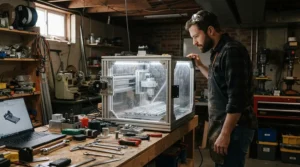
Heated Chamber Printer for ABS and ASA: Passive vs Active Explained
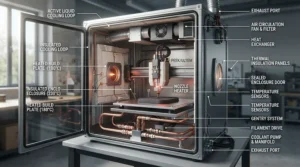
A heated chamber printer for ABS and ASA uses its own heater and thermostat to hold air temperature, independent of the bed and hotend. A passive enclosure simply traps the heat the bed leaks. One manufacturer’s review states the difference plainly: an enclosure traps whatever heat the bed gives off, while a temperature-controlled chamber holds a target on purpose.
| Chamber Style | Examples | Typical Result | Best For | Trade-Off |
|---|---|---|---|---|
| Passive enclosure | Elegoo Centauri Carbon, Bambu Lab P1S | Warm, but varies with room and print length | Small to mid ABS and ASA parts | Large flat parts risk corner lift |
| Bed and fan-managed | Prusa CORE One | Reaches roughly 50–55 °C | Balanced ABS work with low power | No dedicated heater for nylon |
| Active heater | QIDI Q2, QIDI Plus 4, Creality K2 Plus, Bambu Lab H2D | Holds 55–65 °C | Large parts and engineering polymers | Higher cost and power draw |
The comparison shows a clean pattern. Passive designs give most of the benefit for the lowest cost, but their results depend on your room and your part size. Active chambers remove that variable. Choose a passive model if your parts fit within a coffee-mug footprint, and an active one if you routinely print anything long, thin, and flat.
FDM Printer for Printing ASA Parts: What Changes From ABS
An FDM printer for printing ASA parts needs nearly the same hardware as ABS: an enclosure, a hot bed, and a nozzle that reaches 240–270 °C. Most buyer’s guides lump the two together for exactly that reason. Both are amorphous styrenic polymers, both shrink as they cool, and both reward a warm chamber.
The reason people switch is weather. ASA is the usual choice for outdoor and heat-exposed parts because it resists sunlight better than ABS, so garden fittings, car trim, and exterior brackets are the typical use cases. One filament guide describes ASA as the outdoor, heat-resistant option and ABS as the one that smooths well with vapour.
Practically, that means any machine in this guide works for both, but the large-format heated models handle ASA’s long, outdoor-sized parts best. Treat ASA fumes with the same respect as ABS, since both are styrene-based. If you are choosing an FDM printer for printing ASA parts and expect them to be large, the QIDI Plus 4 or Creality K2 Plus make the most sense. For small housings and clips, the Bambu Lab P1S is plenty.
Styrene Fumes: Safety, Filtration, and Ventilation
An enclosure contains styrene fumes only partly. ABS releases ultrafine particles and volatile organic compounds, including styrene, when it is heated and extruded. A comprehensive lab study measured styrene from ABS and high-impact polystyrene filaments across many printers, with rates varying widely by machine.
Real-world workplace data is reassuring but specific. A CDC workplace evaluation found that a ventilated enclosure cut particle number by 99.7% and total organic chemical concentration by 53.2%. Filtration handles particles much better than gases, so a closed box with a HEPA filter does not make ABS risk-free.
A manufacturer-published meta-analysis summarised in one guide puts ABS at roughly 4.6 times the particle count of PLA. It also reports that venting an enclosure outdoors reached 98%+ control efficiency, far above partial enclosures. Treat that as a directional figure, since a manufacturer compiled it.
Practical rules that hold across sources:
- Print in a ventilated room, not a bedroom.
- Use carbon filtration for odors and VOCs, plus a particle filter if available.
- Keep the door closed during prints and let the chamber vent before opening it.
- Consider a window fan or an outdoor duct for frequent ABS jobs.
If you have any respiratory condition, check with a professional before printing ABS indoors. This is a sensitive area, and the evidence is still developing.
Bed Adhesion for ABS and ASA: What Actually Works
Bed adhesion is the other half of beating warping. The enclosure keeps the part warm, but the plate must hold the first layer through the whole print. These are the fixes people use, matched to the problems they solve.
- Corners lift in the first hour: raise the bed to 100–110 °C and let the chamber soak 15–20 minutes before printing.
- Edges curl on long parts: add a brim of several millimetres. Reviewers note a brim or preheat is what keeps passive machines like the Bambu Lab P1S reliable for ABS.
- Part sticks too well or too little: use a clean textured PEI sheet and a thin glue-stick layer, and wash the plate regularly to remove oils.
- Mid-print cracking: turn part cooling fans to minimum for ABS, and keep the door closed.
- A draft ruins one side: move the printer away from windows and vents.
Another point: never run PLA with a fully closed, heated chamber. The QIDI Plus 4 warns about this directly, and PLA softens and jams when it is too warm. Open the lid or turn the heater off for low-temperature filaments.
✨ Don’t Miss These Exclusive Deals!
🔍 Take your ABS printing to the next level with these carefully selected machines. Click on any highlighted printer to check current pricing and availability. The right enclosure will help you create strong, flat, professional-looking parts you’ll be proud to use!
How to Choose an Enclosed Printer for Printing ABS Without Warping
Use these seven steps in order. Each one rules out options before you spend a dollar.
- Measure your longest part. Under about 150 mm, a passive enclosure is usually enough. Over about 200 mm, favor an active chamber.
- Decide passive or active. Passive saves money and power. Active removes the room-temperature variable.
- Check the bed ceiling. Aim for 100–110 °C or more, since that supports the first layer.
- Confirm the nozzle range. ABS needs roughly 240–270 °C, so 300 °C leaves headroom and 350 °C opens other polymers.
- Look at filtration. Carbon and a particle filter help with styrene fumes. Some models treat them as optional add-ons.
- Budget for power and consumables. Heated chambers draw more electricity, and filters need replacing.
- Plan your space. The Creality K2 Plus needs real room. The Elegoo Centauri Carbon fits on a desk.
Based on those steps, most buyers land on the Bambu Lab P1S or QIDI Q2. Large-part makers choose the QIDI Plus 4 or Creality K2 Plus. Anyone prioritizing repairability looks at the Prusa CORE One.
Real-World Scenarios: Which Printer Fits Which Maker
Three profiles show how the same decision lands differently.
The apartment student. A college student prints phone stands, cable clips, and the occasional ABS case in a small shared space, a few times a month. The budget is around $300–$500. The Elegoo Centauri Carbon is the economical fit, but a window fan and a closed door matter more than any spec because of styrene fumes. If their budget stretches, the QIDI Q2 adds chamber heat.
The weekend garage maker. Someone prints outdoor ASA brackets and replacement car parts every weekend, with parts up to 200 mm. The Bambu Lab P1S handles that with a brim and a preheat soak, and its software keeps the workflow simple. A garage still needs ventilation, and winter drafts hurt more than summer ones.
The small-shop engineer. A prototyping shop prints 300 mm ABS panels and housings daily. A passive printer will waste filament here. The QIDI Plus 4 gives a large bed and a heated chamber at a reasonable price, while the Creality K2 Plus suits even bigger jobs. If nylon and carbon-fibre are also on the horizon, the Bambu Lab H2D becomes justifiable.
Enclosed Printer vs Open-Frame Printer with a DIY Enclosure
Some makers skip the purchase and wrap an open-frame printer in a tent or a cabinet, the so-called IKEA Lack hack. It works, but the trade-offs are real.
| Approach | Cost | Chamber Control | Fume Handling | Best For |
|---|---|---|---|---|
| Dedicated enclosed printer, such as the QIDI Plus 4 | Higher upfront | Built-in thermostat and heater | Designed in | Regular ABS and ASA work |
| Passive enclosed, such as the Bambu Lab P1S | Moderate | Passive only | Filtered | Mixed materials, small to mid parts |
| Open-frame plus DIY enclosure | Lower upfront | Manual and variable | You build it | Tinkerers on a tight budget |
Dedicated machines win on consistency and safety, since the heater, electronics, and filtration are designed together. A DIY enclosure can match the cost, but heat near unrated electronics and wiring is a risk you manage yourself. If you enjoy the project, a home-built box is a fair route. If you want parts that simply come out flat, a dedicated machine saves time. For most readers the safer path is a purpose-built one.
Long-Term Cost and Maintenance
The sticker price is only part of the cost. Heated chambers draw real power. The QIDI Q2 is rated at 350 W plus 280 W for the heater, and the QIDI Plus 4 at 450 W plus 400 W. The Prusa CORE One draws around 110 W on ABS settings. Over hundreds of print hours, that gap adds up.
Consumables matter too. Carbon filters need periodic replacement, PEI plates wear, and nozzles eventually need swapping. Hardened nozzles, standard on the Bambu Lab P1S and Elegoo Centauri Carbon, last longer with filled filaments.
Cost-per-use is the useful lens. Failed prints are the hidden expense, so a cheaper passive printer that fails one large ABS print in three can cost more in wasted filament and time than a heated model. Repairability counts as well, and the Prusa CORE One stands out for accessible spare parts.
A simple maintenance rhythm helps: wipe the plate before each print, check chamber fans monthly, replace filters per the maker’s schedule, and clear dust from the electronics area every few months.
Common Mistakes When Buying an Enclosed Printer for ABS
Most regret comes from five avoidable errors.
- Assuming “enclosed” means “heated.” A passive box warms only as much as the bed allows. Check the spec sheet.
- Ignoring part size. A printer that handles small ABS cases may still curl a long panel.
- Skipping filtration. Fumes are not eliminated by a closed door, as the workplace data above shows.
- Buying for materials you won’t print. The 350 °C nozzle and 65 °C chamber of the Bambu Lab H2D are wasted on ABS-only work.
- Forgetting the room. Drafts, cold garages, and tight spaces sabotage even excellent machines.
If you want a deeper grounding in the material itself, the ABS overview on Wikipedia is a solid reference on its composition and properties. A final tip: always compare the spec sheet against reviews, since manufacturers’ chamber figures can differ from what reviewers measure.
Frequently Asked Questions
❓ Is a passive enclosure enough to print ABS on a budget?
❓ What chamber temperature do I need for ABS and ASA?
❓ Do I need a HEPA and carbon filter for ABS?
❓ Which enclosed printer for ABS under $500 should I consider?
❓ Can I add a chamber heater to a printer I already own?
Conclusion
Warped ABS is a temperature-gradient problem, and an enclosure is the cheapest way to solve it. A passive box like the Elegoo Centauri Carbon or Bambu Lab P1S stops most warping on small and mid-sized parts. An actively heated chamber, such as the QIDI Q2, QIDI Plus 4, Creality K2 Plus, or Bambu Lab H2D, removes the guesswork once parts get big. The Prusa CORE One sits between them with a managed chamber and excellent repairability.
Choose by your longest part, not by hype. Pair the machine with a warm bed, a brim, a closed door, and real ventilation for styrene fumes, and the results follow. Remember too that every figure here comes from published specs and reviews, so confirm current prices and chamber ratings before you buy.
Recommended for You
- FDM Printer for Classroom Use with Safety Features: 7 Best Picks 2026
- Auto Bed Leveling FDM Printer for First Time Users: 7 Best 2026
- FDM Printer for Miniature Wargaming Terrain: 7 Best Picks in 2026
Disclaimer: This article contains affiliate links. As an Amazon Associate, I earn from qualifying purchases. If you purchase products through these links, we may earn a small commission at no additional cost to you.
✨ Found this helpful? Share it with your friends! 💬🤗
